
引言
“工作流”是在系统开发中经常被提及的一个概念,比如机器学习平台里需要用工作流串联从建模、训练到预测的全流程,CICD系统需要用工作流打通从开发、构建再到部署的链路,办公自动化中也经常要用到工作流实现逐级审批等,因此很有必要为项目引入一个简单易用,又具有一定抽象度和扩展性的工作流框架——Argo Workflows,它是一个基于 Kubernetes 的工作流组件,通常用来编排节点(任务)依赖关系,然后调度这些节点,让他们以串行或并行方式运行。本文想从开发者角度介绍一下 Argo Workflows 的总体框架与核心能力,还有一些实际工作中很容易用到的特性。
总体架构
Argo Workflows 遵循 Kubernetes 的开发范式,总体架构还是比较清晰的,如下图所示:
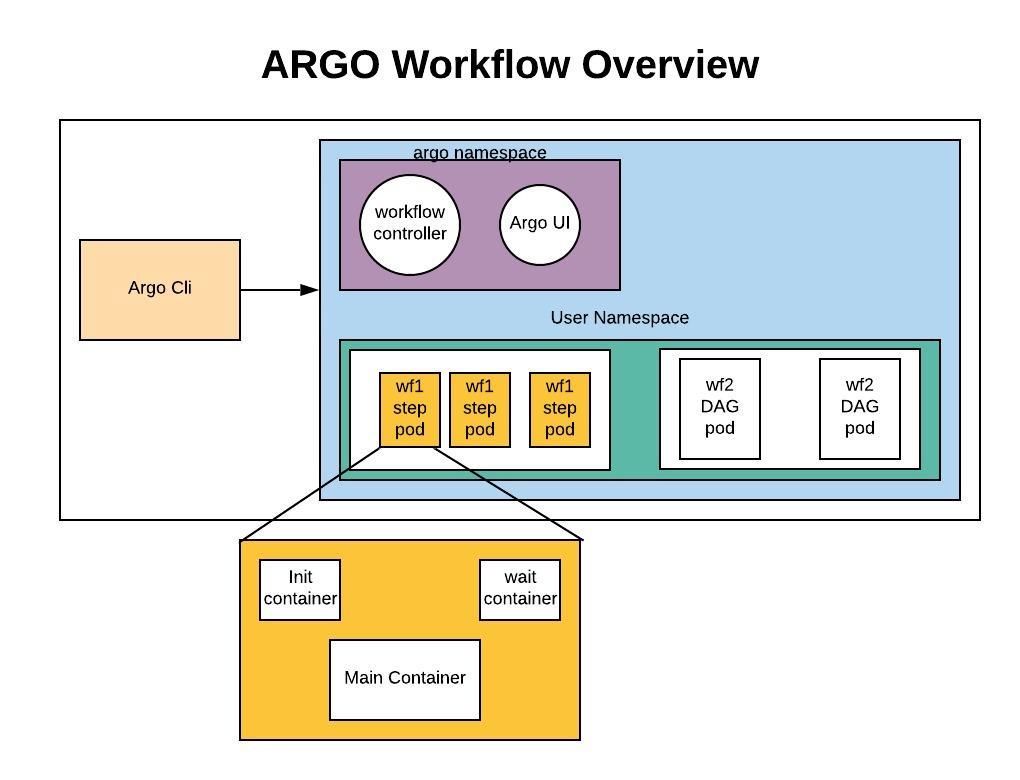
从图中可以看到下面几个核心组件:
- Workflow CRD:Workflow 资源描述文件,文件定义了 Workflow 内各执行节点的依赖关系、串/并行行为、入参出参、退出回调等。
- Workflow Controller:Workflow 调度与生命周期管理控制器,负责监视 Workflow CR 的创建、更新与删除,并控制 Workflow 实例及每个实例下节点的运行。
- Argo UI:提供 Web GUI 页面工具,可视化观测 Workflow 实例的运行动态,以及一些运维工具。
- Argo Cli:命令行工具,可以更加方便简洁地对 Workflow 实例进行创建、查看、删除等操作。
Argo UI 和 Arg Cli 作为客户端为用户提供了更便捷的访问入口,而 Workflow CRD 和 Workflow Controller 作为服务端提供了控制 Workflow 实例调度、运转与管理的能力,最终 Workflow 内每个节点将作为核心的业务执行单元,以 Kubernetes 原生 Pod 形式运行。
Workflow CRD
Workflow CRD 遵循 Kubernetes CRD 标准规范定义,可以简单理解为是描述 Workflow 配置的一份文件,里面包含了对 Workflow 本身的配置定义,又包含了对每个运行节点及它们之间依赖关系的配置定义。下面是一个最简单的 Workflow CR:
apiVersion: argoproj.io/v1alpha1
kind: Workflow                  # new type of k8s spec
metadata:
  generateName: hello-world-    # name of the workflow spec
spec:
  entrypoint: whalesay          # invoke the whalesay template
  templates:
    - name: whalesay              # name of the template
      container:
        image: docker/whalesay
        command: [ cowsay ]
        args: [ "hello world" ]
        resources: # limit the resources
          limits:
            memory: 32Mi
            cpu: 100m
Workflow CRD 里很重要的一个概念是 templates,它用来描述这个工作流下节点的执行内容与参数,以及节点与节点间的依赖关系,串行还是并行执行。templates 有三种类型:
- Container:不可再细分的原子类型 template,也可以理解为必须要定义某个节点对应的 container 执行行为的 template(比如上面的 whalesay 就是),包括容器名称、资源定义、镜像、启动命令、执行参数等,与我们定义 pod 里的 container 无异。
- Steps:分步执行类型的 template。这种 template 将一系列节点以串行或并行方式编排,并指定每个节点用到的 template,这个 template 通常就引用 container 类型的 template,但如果有复杂场景,也支持嵌套引用 steps 或 dag 类型的 template。关于 steps 后面会给出一个示例讲解。
- DAG:依赖关系类型的 template。这种 template 更加灵活,是上面 steps 的另外一种表示方式,它针对每个节点定义了他们所依赖的上游节点名称,或串行或并行执行,每个节点的 template 同上可以任意引用。关于 dag 后面也会给出一个示例讲解。
Arguments
上面展示了一个最简单的 container template 用法,但既然被叫做模版,那每个节点总不能都执行一样的内容吧,因此 Argo Workflows 还提供了在 template.inputs 定义参数的功能,然后用 {{ inputs.parameters.xxx }} 来引用参数,如下所示:
apiVersion: argoproj.io/v1alpha1
kind: Workflow
metadata:
  generateName: hello-world-parameters-
spec:
  # invoke the whalesay template with
  # "hello world" as the argument
  # to the message parameter
  entrypoint: whalesay
  templates:
  - name: whalesay
    inputs:
      parameters:
      - name: message       # parameter declaration
        value: hello world
    container:
      # run cowsay with that message input parameter as args
      image: docker/whalesay
      command: [cowsay]
      args: ["{{inputs.parameters.message}}"]
但如果多个 template 都想引用同一个参数,那么可以省略 inputs 这块,直接在 spec.arguments 定义参数,然后在 template 中用 {{ workflow.parameters.xxx }} 来引用参数,像下面这样:
apiVersion: argoproj.io/v1alpha1
kind: Workflow
metadata:
  generateName: global-parameters-
spec:
  entrypoint: A
  arguments:
    parameters:
    - name: log-level
      value: INFO

  templates:
  - name: A
    container:
      image: containerA
      env:
      - name: LOG_LEVEL
        value: "{{workflow.parameters.log-level}}"
      command: [runA]
  - name: B
    container:
      image: containerB
      env:
      - name: LOG_LEVEL
        value: "{{workflow.parameters.log-level}}"
      command: [runB]
Steps Template
Steps Template 其实很好理解,就是当你要编排一个 Workflow 下各节点的执行顺序和依赖关系的时候,就可以用它。下面是一个示例:
apiVersion: argoproj.io/v1alpha1
kind: Workflow
metadata:
  generateName: steps-
spec:
  entrypoint: hello-hello-hello

  # This spec contains two templates: hello-hello-hello and whalesay
  templates:
  - name: hello-hello-hello
    # Instead of just running a container
    # This template has a sequence of steps
    steps:
    - - name: hello1            # hello1 is run before the following steps
        template: whalesay
        arguments:
          parameters:
          - name: message
            value: "hello1"
    - - name: hello2a           # double dash => run after previous step
        template: whalesay
        arguments:
          parameters:
          - name: message
            value: "hello2a"
      - name: hello2b           # single dash => run in parallel with previous step
        template: whalesay
        arguments:
          parameters:
          - name: message
            value: "hello2b"

  # This is the same template as from the previous example
  - name: whalesay
    inputs:
      parameters:
      - name: message
    container:
      image: docker/whalesay
      command: [cowsay]
      args: ["{{inputs.parameters.message}}"]
从上面可以看出定义了一个新的叫做 hello-hello-hello 的 Steps Template,其中双横线 “- -” 表示步骤自上而下、串行执行,而单横线 “-” 表示同级步骤并行执行。下面是用 Argo Cli 查看得到的这个 Workflow 实例的工作状态:
STEP            TEMPLATE           PODNAME                 DURATION  MESSAGE
 ✔ steps-z2zdn  hello-hello-hello
 ├───✔ hello1   whalesay           steps-z2zdn-27420706    2s
 └─┬─✔ hello2a  whalesay           steps-z2zdn-2006760091  3s
   └─✔ hello2b  whalesay           steps-z2zdn-2023537710  3s
DAG Template
DAG Template 其实是与 Steps Template 等价的另外一种书写方式,只是它在描述依赖关系的时候更加精确,每个节点直接指定它所依赖的上游节点名字,像下面这样:
apiVersion: argoproj.io/v1alpha1
kind: Workflow
metadata:
  generateName: dag-diamond-
spec:
  entrypoint: diamond
  templates:
  - name: echo
    inputs:
      parameters:
      - name: message
    container:
      image: alpine:3.7
      command: [echo, "{{inputs.parameters.message}}"]
  - name: diamond
    dag:
      tasks:
      - name: A
        template: echo
        continueOn:
          error: true
          failed: true
        arguments:
          parameters: [{name: message, value: A}]
      - name: B
        dependencies: [A]
        template: echo
        arguments:
          parameters: [{name: message, value: B}]
      - name: C
        dependencies: [A]
        template: echo
        arguments:
          parameters: [{name: message, value: C}]
      - name: D
        dependencies: [B, C]
        template: echo
        arguments:
          parameters: [{name: message, value: D}]
从上面可以看到,DAG Template 大多配置与之前的都一样,比较关键的一项配置是节点的 dependencies,里面指定了节点所依赖的其他节点的名称。其中 task A 设置了参数 continueOn,这表明当这个节点运行产生 Failed 或 Error 的时候,都不会导致整个 Workflow 实例直接失败,而会继续运行下面的节点,但下面的节点其实又依赖节点 A,因此这种设置方法是自相矛盾的,仅适合一些特殊的业务场景使用。
RetryStrategy
节点执行的时候难免会因为特殊原因失败,Workflow 为此支持了重试策略 retryStrategy,可以定义在失败的时候是否重试、重试几次等,如下所示:
# This example demonstrates the use of retry back offs
apiVersion: argoproj.io/v1alpha1
kind: Workflow
metadata:
  generateName: retry-backoff-
spec:
  entrypoint: retry-backoff
  templates:
  - name: retry-backoff
    retryStrategy:
      limit: 10
      retryPolicy: "Always"
      backoff:
        duration: "1"      # Must be a string. Default unit is seconds. Could also be a Duration, e.g.: "2m", "6h", "1d"
        factor: 2
        maxDuration: "1m"  # Must be a string. Default unit is seconds. Could also be a Duration, e.g.: "2m", "6h", "1d"
      affinity:
        nodeAntiAffinity: {}
    container:
      image: python:alpine3.6
      command: ["python", -c]
      # fail with a 66% probability
      args: ["import random; import sys; exit_code = random.choice([0, 1, 1]); sys.exit(exit_code)"]
- limit:容器失败时最大重试次数
- retryPolicy:容器在何种失败场景下进行重试,如OnFailure(default), OnError, Always, OnTransientError
- backoff:每次重试之间时间间隔的衰减配置
- duration:起始时间间隔
- factor:每次重试的时间间隔为前一次的几倍
- maxDuration:最大时间间隔
- affinity
- nodeAntiAffinity:节点反亲和设置,避免每次重试调度到同一节点
Exit Handler
当一个 Workflow 运行结束后如果希望做一些事情,那么 Exit Handler 就可以派上用场。一些常见场景有:
- 发送消息通知
- 重新提交 Workflow 或 提交一个新的 Workflow
- 清理该 Workflow 产生的临时数据
- 上报该 Workflow 的完成状态给数据库
Exit Handler 的定义方法如下:
apiVersion: argoproj.io/v1alpha1
kind: Workflow
metadata:
  generateName: exit-handlers-
spec:
  entrypoint: intentional-fail
  onExit: exit-handler                  # invoke exit-handler template at end of the workflow
  templates:
  # primary workflow template
  - name: intentional-fail
    container:
      image: alpine:latest
      command: [sh, -c]
      args: ["echo intentional failure; exit 1"]

  # Exit handler templates
  # After the completion of the entrypoint template, the status of the
  # workflow is made available in the global variable {{workflow.status}}.
  # {{workflow.status}} will be one of: Succeeded, Failed, Error
  - name: exit-handler
    steps:
    - - name: notify
        template: send-email
      - name: celebrate
        template: celebrate
        when: "{{workflow.status}} == Succeeded"
      - name: cry
        template: cry
        when: "{{workflow.status}} != Succeeded"
  - name: send-email
    container:
      image: alpine:latest
      command: [sh, -c]
      args: ["echo send e-mail: {{workflow.name}} {{workflow.status}} {{workflow.duration}}"]
  - name: celebrate
    container:
      image: alpine:latest
      command: [sh, -c]
      args: ["echo hooray!"]
  - name: cry
    container:
      image: alpine:latest
      command: [sh, -c]
      args: ["echo boohoo!"]
Timeouts
可以在 Workflow 或 template 上设置执行的超时时间,以免因为个别节点阻塞整个 Workflow 的运行,如下所示:
apiVersion: argoproj.io/v1alpha1
kind: Workflow
metadata:
  generateName: timeouts-
spec:
  activeDeadlineSeconds: 10 # terminate workflow after 10 seconds
  entrypoint: sleep
  templates:
  - name: sleep
    activeDeadlineSeconds: 5 # terminate container after 5 seconds
    container:
      image: alpine:latest
      command: [sh, -c]
      args: ["echo sleeping for 1m; sleep 60; echo done"]
Suspending
如果希望暂停 Workflow 的执行,可以加入一个包含 suspend 配置的 template,然后在需要暂停的地方引用它,如下所示:
apiVersion: argoproj.io/v1alpha1
kind: Workflow
metadata:
  generateName: suspend-template-
spec:
  entrypoint: suspend
  templates:
  - name: suspend
    steps:
    - - name: build
        template: whalesay
    - - name: approve
        template: approve
    - - name: delay
        template: delay
    - - name: release
        template: whalesay

  - name: approve
    suspend: {}

  - name: delay
    suspend:
      duration: "20"    # Must be a string. Default unit is seconds. Could also be a Duration, e.g.: "2m", "6h"

  - name: whalesay
    container:
      image: docker/whalesay
      command: [cowsay]
      args: ["hello world"]
一旦暂停,Workflow 将不会再调度后面的节点,而是一直等到暂停的时间结束。
结语
Argo Workflows 其实还有很多特性本文没有介绍,比如生成/消费artifacts、执行scripts、挂载secrets/volumes等,更多详细的用法可以参考官方文档。另外需要注意的是,Argo Workflows 因为本质是基于 Kubernetes 的 etcd 数据库保存工作流配置和运行数据,数据会有时效性,因此如果希望持久保存,建议还是自己实现一个 Persist Controller 来监听 Workflow CR 的生命周期并持久化到关系型数据库。